Showing posts with label prosoundweb article. Show all posts

Sunday, March 19, 2017

Microphone Techniques For Performers On Stage in Plays and Musicals


Here is a great article about the challenges about using microphone for performers on stage in plays, musicals, dance, opera, etc. This in not the same kind of close, direct miking that you use when mixing a rock band. It takes a great amount of skill to make things sound right and you are always learning how to do it better on every new show...

Click the link to read the full article featured today on Prosoundweb.com:
http://www.prosoundweb.com/channels/live-sound/putting-them-microphones-that-is-on-the-floor/


Friday, January 20, 2017

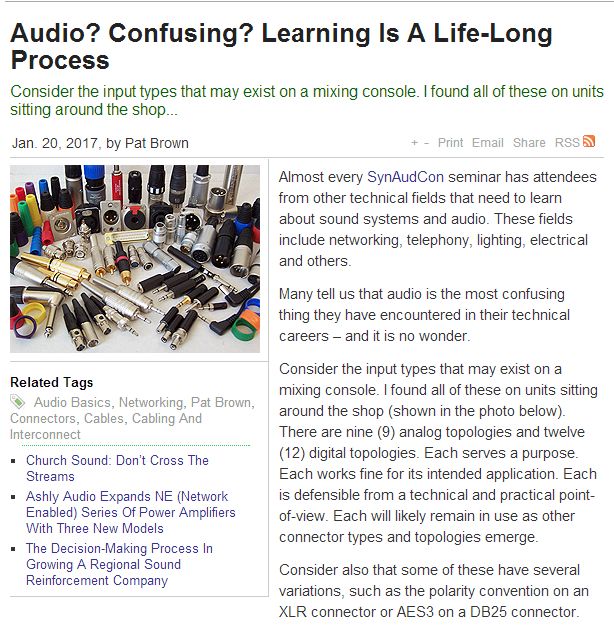
Consider The Inputs That May Exist On A Mixing Console....


http://www.prosoundweb.com/article/audio_confusing_learning_audio_is_a_life_long_process/


I just saw this article on the Prosoundweb page and I wanted to post it. Most sound technicians are completely familiar with all the inputs featured in the picture however, for new sound technincians some have never seen or even used many of the inputs on a standard mixing console. So, here is a guide to help those people learn... Keep On Rockin' - Cheers from "Soundtechguy"!


Wednesday, September 14, 2016

DIY Press Mult - A Simple and Inexpensive Design

Here is an article written by Mike Sokol and how he created a DIY Press Mult from a few DI boxes and cables. The idea is genius! Read the following article to see how Mike Sokol came up with the design.


Thursday, August 4, 2016

Improvising With Sound When You Don't Have Enough Inputs

Once again, Mr. Craig Leerman has provided us with yet another excellent article on how be creative with less when working with sound. This article highlights how to maximize mixing console layouts for those time when you don't have enough inputs on a show. Sometimes it happens when you are given tech rider for show and then things are changed on show day and you may not have enough gear to support those changes. That is when you need to improvise and make thing work. Read this great article and find out some solutions to help you out when you are stuck on a show.

http://www.prosoundweb.com/article//in_focus_making_it_work/?dtc=2


In the article, Craig Leerman talks about always carrying a compact "utility" mixer to every gig which can be put into service as a sub-mixer to the main console, a distribution amplifier for outputs, a press mult, and even an adapter to interface a device to the main mixer.


Personally, I have a BEHRINGER XENYX 1204 USB mixer that sports 4 - XLR mic inputs, one-knob compressors on mic inputs, 2 - stereo inputs, 2 - pairs of main outputs, control room outputs, ALT3/4 outputs and RCA inputs for interfacing an mp3 player, laptop or tablet with a simple y-cable.


Almost every mixing console manufacturer has a line of compact, utility mixers available. Here are a selection of a some below:

MACKIE ProFX8:

This mixer packs a load of features in a small footprint!
4 -XLR Inputs, 3 - Stereo Inputs, 7-band Graphic built-in, EFX processor built-in, 3-band EQ on every channel, USB Input with level control, RCA inputs and outputs with level control, Monitor Send, EFX Send, Stereo Return Inputs, and Phantom power.


YORKVILLE SOUND PGM8:

Similar features to the Mackie Pro8FX with the addition of 2 extra XLR inputs with stereo inputs when you need just a couple more mic inputs. Also included is a Hi-Z switch on one of the mono input channels that will allow to you patch in a high impedance instrument without the need for an additional DI box.


YAMAHA MG12XU:

Similar features to the Mackie, Yorkville, and Behringer mixers above.
Includes 2 in/2 out USB functions for connecting you laptop for audio or recording with included Cubase AI DAW software download version. For those times when you need to make a simple recording of a presentation or other audio feed on on show.


SOUNDCRAFT SIGNATURE 10:

Soundcraft took the best features from some of the past, analog mixing consoles and designed it into the Signature Series. Even in the the smallest model Signature 10 you get the famous Ghost mic preamps, Sapphire British EQ with sweepable mids, Lexicon branded effects engine, dbx Limiters (High Ratio Compressors on inputs channels, Hi Pass (Low Cut) filters and 48V Phantom Power on all mic channels, 2 in/2 out USB playback and recording, Switchable Hi-Z inputs for guitars, basses and other instruments, and GB Series Audio Routing functions.


As you can see there is so many features that can be packed into a compact mixer and you should always carry one with you to every show or gig your work. Think of it as your sound safety net that will help out in a pinch when you don't have enough inputs. Happy Mixing!!!

Saturday, May 7, 2016

Miking A Grand Piano - What's Your Best Way?

As a freelance sound technician I don't often get to mike up a real grand piano for a show. When the chance comes around, I have always had limited success with the whole thing. As I learned later on, some microphones are much better suited for this task than others.

Today I found a small article on Prosoundweb.com all about capturing the sound of the"Grand Mother" of all instruments.

What is your best way to mike a grand piano???
I took to the web to find some images of different ways that other sound techs mike the grand piano:


Sunday, April 10, 2016

Gig Savers: In-Depth Primer by Craig Leerman


This is great article for all sound technicians. Regardless of the size of show you are working on, there is always a need to have the right tools for the job. Craig Leerman of Tech Works give us an in-depth primer on the interconnect and test tools to make your show work. He calls them "Gig Savers" and every professional sound technician should carry them with them for every gig. You can find the full article here:  http://www.prosoundweb.com/article/gig_savers/

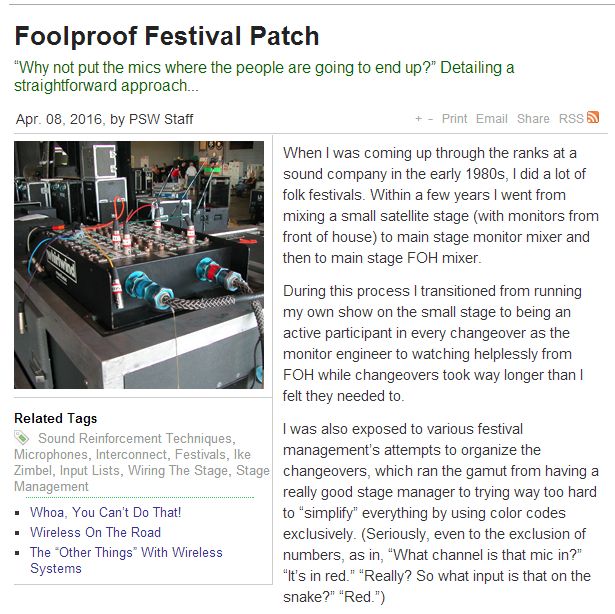
Foolproof Festival Patch Method by Zimbel Audio Productions


Here is another excellent live sound article written by Ike Zimbel of Zimbel Audio Productions.
It is featured on the Prosoundweb.com site and it available to read here: http://www.prosoundweb.com/article/foolproof_festival_patch/P1/


Wednesday, March 23, 2016

Using Phase and Moving Around Stage Monitors To Remove Feedback


When you are working with stage monitors and you get feedback, what is your first instinct to do?
Most of us go to our trusty graphic EQ for that monitor mix and pull out the offending frequency.

Another method to remove the problem is to actually move the stage monitor to a new location on stage to eliminate the feedback. It makes sense but, sometimes we forget to try the obvious tricks first.

Here is the link to a great article on this subject:

http://www.prosoundweb.com/article/moving_the_problem_out_of_the_way_using_phase_to_manage_feedback/P1/

This article is written by Peter Janis, president of Radial Engineering Ltd. Radial is a Canadian manufacturer of professional audio products. Direct boxes, snake systems and cabling, switchers, interfaces along with Tonebone guitar effects pedals and Primacoustic acoustical products for professional use.

For more details, check out the Radial Engineering Ltd. web site at the following link:

http://www.radialeng.com/


Happy Mixing!

Friday, March 11, 2016

Speaker Lines On A Snake Cable: Not Recommended


Found a really important article on Prosoundweb.com about using a standard snake cable to run the speaker lines from a powered mixer at FOH to the stage. Yes, this IS a bad idea! The return lines on a mic snake cable have thin gauge conductor wiring that is not designed to handled the high output from a power amp or powered mixer. Too much resistance along the cable robbing much of the power of your power amp or powered mixer.

Click here for the link to the article:
http://www.prosoundweb.com/article/speakers_on_a_snake/


If you are using a powered mixer at the FOH position, you should really be using thick conductor speaker wiring to run the outputs to the loudspeakers onstage. It is best to use 12 or 14 gauge speaker wiring to run the signals over longer distances to loudspeakers.


A better way is to make use of the patch panel on most powered mixers and bypass the internal power amp. Patch the return lines of your snake cable to the line level outputs on your powered mixer sending your signals to a separate power amplifier located on stage nearest to the loudspeakers.
(ie: patch panel on a powered mixer - bypasses the internal power amp)


Another option is swap out your standard snake for a powered series snake cable that has dedicated speaker level lines running through the core of the snake. The outputs are clearly marked as speakers outputs not to confused with the regular return lines. A number of manufacturers have a line of snake cables designed for use with power mixers. (ie: Whirlwind makes the Power Series snake cables - see photo)


Wednesday, December 2, 2015

Taking Care CDs, DVDs, and Cassette Tapes

For most people these days, music that they listen to is usually downloaded from the internet and played back on their Smart phones, tablets or MP3 players. Only a small percentage of people still actually use CDs, DVDs, Vinyl records and even cassette tapes. I personally still like to listen to my music on CD but, I do still have a box cassette tapes in my collection. I have even gone to the extent of transferring some of my cassette tapes to my computer allowing me to make a CD copy to play in the car, etc.

Today, I came across an article on Prosoundweb.com that discussed how to maintain magnetic and optical media (ie: CDs, DVDs, and Cassettes). The article tells you how to solve problems with your media. Like a scratched CD or a crinkled and snapped cassette tape.
Click here for the article: 

So, if you still have recordings on these older formats, take a few minutes to read this article and learn how to keep your collection in good shape. For all the younger people out there who have never seen or used a cassette tape, see the diagram below:


.....And Here is a picture of a typical dual cassette deck that will playback and record onto the above shown cassette tape:


With a dual cassette deck, one deck is playback only while the other is playback and record. This allows you to playback a pre-recorded cassette on the playback only deck and record a copy onto a blank cassette using the record deck. Blank cassettes available with various time capacities. Standard formats are C-60 and C-90 which meant 60 mins total recording time and 90 mins total recording time respectively. Recording is available both "sides" of the cassette tape. A C-60 tape will be 30 mins per side and a C-90 tape will be 45 mins per side.

Some samples of 60 min. and 90 min blank cassette tapes (new):


Monday, November 23, 2015

Wiring The Stage Efficiently and Safely

Today, the feature article on Prosoundweb.com is all about wiring up the stage efficiently and safely. There are some excellent tips to help every sound technician when wiring the stage. Here is the link to the article on the web site:


Another great resource I found was a downloadable spec sheet on "Stage Zones" by Radial Engineering. They are a company that manufactures snake systems and cabling assemblies and custom patch solutions. Radial products featured in the document are the: Stage Flea, Stage Bug, and Stage Slug. These are various kinds of sub snake systems for cleaning up stage wiring. 
The document features a diagram showing how the stage can be divided up into "Zones" making the wiring the stage more efficient, clean and safe. Click here to go to the Radial Engineering web site and download the PDF document:


Friday, October 16, 2015

Repair Or Replace Sound Reinforcement Gear?

Today, I read an article on the Prosoundweb.com site entitled "The Decision To Repair Or Replace Sound Reinforcement Gear" by Bruce Bain. This article is perfectly suited for this time of year if you are a sound company owner. The summer months are gone and fall is already here providing time to take inventory of all your sound gear and see what needs to cleaned, repaired, painted, or replaced.
Here is the link: http://www.prosoundweb.com/article/the_decision_to_repair_or_replace_gear/P1/


Back in the Jan/Feb 2014 issue of Canadian Musician magazine, is an article that I wrote called "Buying Used Sound Gear". It was my take on the process of buying used sound gear to create a PA system for bands, musicians and independent sound technicians like myself. In it I talk about the idea of contacting local,  sound productions to see what kind of quality, used gear they are selling off to replace with new, updated gear. Here is the link: http://issuu.com/cmonline/docs/sp_cm_janfeb14_2_/60


I was thinking about writing a follow-up article to my first one but, I believe that Bruce has touched on everything I would have talked about. Thank you Bruce!


Monday, July 13, 2015

Making The Live Mix Work No Matter What by Dave Rat

Once again, Dave Rat has written a wonderful article on how to achieve a great sound mix regardless of what happens during the show. Thank you very much, Dave!

As soon as I read this article, I was reminded of a few gigs that went downhill rather quickly and everything went wrong. Yes, I did get upset and yes, I did panic and make even more mistakes. Since then, I have come to realize that staying calm during these situations is the best thing to do.


Dave mentions in his article about taking a step back and assessing the situation while staying calm. More often than not, the problem is usually something that is minor and can be fixed easily with just a little bit of thought and not panic.

Here is the link to article on the Prosoundweb site:
http://www.prosoundweb.com/article/laying_the_foundation_making_the_live_mix_work_no_matter_what/


Tuesday, November 25, 2014

What Artist or Band Would You Like To Mix Sound For?

Tonight I was reading about the tour profile of Canadian artist Sarah McLachlan. In the article, the tour technicians were saying how it felt like working with a big family during the tour. These seasoned technicians all said that it was their favourite gig to come home to. The techs all loved working with such an awesome group of very talented musicians. Those are great reviews coming from the guys who put together the shows each night!
Here is a link to the article on Prosoundweb.com:
http://www.prosoundweb.com/article/print/tour_profile_laws_of_illusion

Sarah McLachlan live in concert during Laws Of Illusions Tour


After reading the article I got thinking about which artists I would love to mix sound for if given the opportunity. Here is my list in no particular order:

- Sarah McLachlan
- Jann Arden
- Rik Emmett
- Bruce Cockburn
- Lawrence Gowan
- Colin James
- Randy Bachman
- Barenaked Ladies
- See Spot Run
- Manteca (jazz band)
- Holly Cole Trio
- Blue Rodeo
- Susan Aglukark
- Great Big Sea

Now, you will read my list and notice that I picked All Canadian artists and bands. I truly love Canadian music and most I have seen in concert before. My list is a reflection of the kind of music that I enjoy listening to. I would love to have the opportunity to get behind the console and mix all these wonderful artists. If not mixing the show, then the chance to work on the sound crew getting the systems setup for the shows.

A message to the touring techs on these shows. Would you be able to offer me this opportunity on a show? If so, please contact me directly to discuss the details. I would appreciate the future opportunities! Here is my card. Cheers!!!


Monday, July 7, 2014

Going Direct: The Ins and Outs of DI Boxes

Today, I found this great article on Prosoundweb.com talking about direct boxes. As a sound tech I have always had my questions about direct boxes and which types to use in live sound setups. This article is a great guide letting you know which type of DI box to use for all types of instrument hookups.

Here is the link to the article:

Over the years, I have used a number of brands of DI boxes for all kinds of audio hookups. One of my favourite brands is Radial Engineering. They are made in Canada out west and used my hundreds of audio professionals across the country.

Direct boxes come in two types: passive and active. Each type has its advantages and uses. (Note: the article has comments from seasoned audio professionals on the types of DI boxes they use.)

Here are some of the Direct Boxes that I have used over the years on stages:

BSS AR-133 Active Direct Box

 Countryman Type 85 Active Direct Box

 Radial JDI Passive Direct Box

 Whirlwind IMP 2 Passive Direct Box

 Yorkville Sound YDI-1P Passive Direct Box

This is just handful of all direct boxes available on the market. Many of them are built tough to withstand the use and abuse on the concert stages of the world. Check out the manufacturer web sites for the complete lines of direct boxes available.

Monday, June 16, 2014

Radial Introducing SB5W Wall-Mounted Stereo Direct Box (“WallDI”) At InfoComm 2014

What a cool idea! Radial Engineering has come up with a stereo DI box that can be mounted inside a standard wall socket. They will be featuring it at the InfoComm 2014 show in Las Vegas this year.

This is a really great idea! I can just see how it could be used for so many kinds of audio/video installations.
It would be a perfect fit for a school gymnasium installation where a basic stereo input is required to feed the audio signal from an MP3 player or a laptop computer or other line level signal source.

I look forward to reading the specs on this item and seeing how easy it is to integrate it into any kind of audio system/installation project. Here is a picture of the device:


Click on the following link to read the entry taken from the www.prosoundweb.com site:
http://www.prosoundweb.com/article/radial_introducing_sb5w_wall-mounted_stereo_direct_box_walldi_at_infocomm_2/


Tuesday, April 22, 2014

Church Sound: Building A Portable Sound System


Okay, here is an article written by Mike Sessler about how to build a portable sound system for church. Of course, this would also work for any kind of group or use.
Click the link to view the article:
http://www.prosoundweb.com/article/church_sound_building_a_portable_system1/P1/

This article is a great find for me personally as I am helping out with a small project at my kid's school. The school currently has a portable, rolling rack sound system that is in need of some TLC and upgrades. I will be working with the teacher who is the "tech person" at the school to help solve the problems with the current system to make things work better.

Since most schools have limited funds for purchasing things like new sound gear, we are going to do a little searching to see what kind of quality, used gear is available that would work for the upgrades and fixes to the current system. The sound system will remain as a portable style setup to keep things simple for the time being. In the future, the school would like to consider a permanent sound system installation once funding can be allocated to do so.

Both my kids attend the public school which has a standard gymnatorium venue which is essentially a gymnasium with a proscenium style stage at one end. There is so much potential for this venue and I am going to volunteer my time with the school to help them out with their sound system issues.
Here is a picture of the gymnatorium at the school.